What Is Bing Chat Enterprise? A 2026 Guide for UK Businesses
Artificial intelligence has quickly become part of everyday business technology.
Employees now use AI tools to research topics, summarise information, draft emails, generate ideas and solve problems. However, public AI services can create serious data-protection concerns when staff enter confidential business information without understanding how it may be processed.
Microsoft originally introduced Bing Chat Enterprise to provide organisations with a more secure, work-focused AI chat experience.
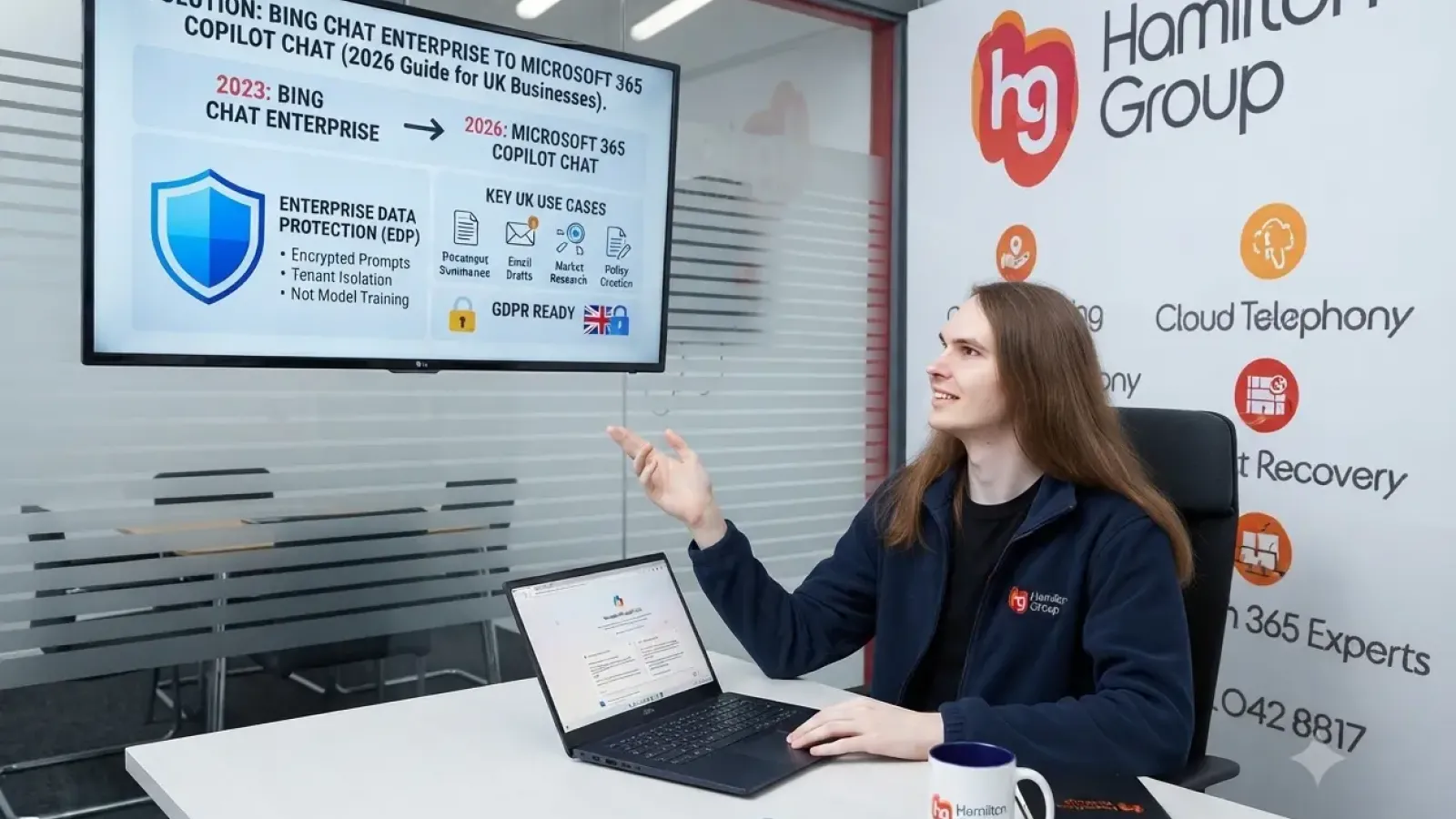
The name can now cause some confusion because Bing Chat Enterprise no longer exists as a separate product. Microsoft renamed Bing Chat and Bing Chat Enterprise to Microsoft Copilot in 2023. The protected workplace chat experience has since evolved into what Microsoft now calls Microsoft 365 Copilot Chat.
For businesses researching Bing Chat Enterprise in 2026, the relevant service is therefore Microsoft 365 Copilot Chat.
This guide explains what the service is, how it differs from the paid Microsoft 365 Copilot licence and what UK businesses should consider before rolling it out.
What Was Bing Chat Enterprise?
Bing Chat Enterprise was Microsoft’s business version of its AI-powered web chat.
It was designed to give employees access to generative AI while adding commercial data protections that were not necessarily available when using consumer AI services.
Users could ask questions, request summaries, generate content and research topics using a conversational interface supported by information from the web.
The defining difference was that employees signed in using their organisational Microsoft account rather than using the service solely as a consumer.
Microsoft later simplified its branding by renaming both Bing Chat and Bing Chat Enterprise to Copilot.
What Is Bing Chat Enterprise Called in 2026?
In 2026, the closest equivalent is Microsoft 365 Copilot Chat.
Microsoft 365 Copilot Chat provides a secure AI chat experience for eligible users who sign in with a Microsoft Entra work or school account.
It should not be confused with the separately licensed Microsoft 365 Copilot, which provides deeper integration with organisational information and Microsoft 365 applications.
The similarity between the names can make purchasing and deployment decisions difficult, so businesses should understand the distinction before proceeding.
What Is Microsoft 365 Copilot Chat?
Microsoft 365 Copilot Chat is an AI-powered chat service intended for workplace use.
Employees can use it to:
- Ask questions
- Research subjects
- Summarise information
- Draft content
- Generate ideas
- Analyse uploaded material
- Create outlines and plans
- Rewrite text for different audiences
- Work with web-based information
- Use supported agents and workplace tools
Copilot Chat is available at no additional cost to eligible users with a Microsoft Entra account and a qualifying Microsoft 365 subscription. Microsoft notes that some additional capabilities, such as certain agent scenarios, can involve Azure or Copilot Studio consumption charges.
What Is Enterprise Data Protection?
One of the most important features of Microsoft 365 Copilot Chat is Enterprise Data Protection, commonly shortened to EDP.
Enterprise Data Protection refers to the contractual, privacy, security and compliance commitments Microsoft applies to workplace Copilot data.
According to Microsoft, prompts and responses in Copilot Chat are processed within the Microsoft 365 service boundary. They receive protections associated with Microsoft’s commercial services, including encryption, tenant isolation and the commitments provided under Microsoft’s Data Protection Addendum and Product Terms.
Microsoft also states that prompts and responses protected by EDP are not used to train the underlying foundation models.
This is a critical distinction for businesses concerned about employees entering internal information into public AI platforms.
How Do Users Receive Enterprise Data Protection?
Enterprise Data Protection applies when an eligible user accesses Copilot Chat while signed in using their Microsoft Entra work or school account.
Microsoft says no separate administrator action is required to activate EDP for eligible signed-in users.
However, businesses should not interpret this as meaning that no governance or configuration work is necessary.
Administrators should still consider:
- Who is permitted to use AI tools
- What information employees may enter
- Whether web search should be enabled
- Which files may be uploaded
- How user activity is monitored
- What retention and compliance policies apply
- Whether access should be limited to managed devices
- How employees will be trained
The technical protection may be available automatically, but safe business use still requires appropriate policies and oversight.
Is Copilot Chat the Same as Microsoft 365 Copilot?
No.
Microsoft 365 Copilot Chat and the paid Microsoft 365 Copilot licence are related, but they do not provide the same experience.
Microsoft 365 Copilot Chat
Copilot Chat is primarily a secure workplace chat experience.
It can work with web information, user-provided prompts, uploaded files and supported agents. It provides Enterprise Data Protection when eligible users sign in with their organisational accounts.
It is available at no additional licence cost with eligible Microsoft 365 subscriptions, although some metered agent capabilities can incur separate charges.
Microsoft 365 Copilot
Microsoft 365 Copilot is the paid productivity product that integrates with Microsoft Graph and Microsoft 365 applications and services.
Depending on the user’s permissions and the supported scenario, it can work with organisational information from services such as:
- Outlook
- Teams
- Word
- Excel
- PowerPoint
- SharePoint
- OneDrive
Microsoft describes Microsoft 365 Copilot as an AI productivity tool that combines large language models with Microsoft Graph and Microsoft 365 apps and services.
The paid product is designed to deliver a more context-rich assistant that can work across the information employees are already authorised to access.
Why Might a UK Business Use Copilot Chat?
Copilot Chat can provide organisations with a managed starting point for workplace AI.
Rather than allowing employees to create personal accounts across numerous public AI platforms, a business can direct users towards an approved Microsoft service protected by organisational sign-in and enterprise data controls.
Potential uses include the following.
Drafting Business Content
Employees can use Copilot Chat to create first drafts of:
- Emails
- Reports
- Proposals
- Policies
- Presentations
- Website content
- Customer communications
- Meeting agendas
The content should still be reviewed by a knowledgeable employee before it is used or published.
Summarising Information
Copilot Chat can help condense lengthy information into:
- Executive summaries
- Key points
- Action lists
- Plain-English explanations
- Comparisons
- Briefing notes
Users should confirm that the summary accurately reflects the original material.
Research and Idea Generation
Employees may use the tool to explore:
- Industry trends
- Marketing concepts
- Project ideas
- Process improvements
- Training topics
- Customer questions
- Alternative approaches
Where web search is involved, users should verify important claims against reliable sources.
Rewriting and Improving Text
Copilot Chat can help employees:
- Improve clarity
- Correct grammar
- Change tone
- Shorten text
- Expand an outline
- Make technical content easier to understand
- Adapt communications for different audiences
This can be particularly helpful for employees who do not regularly produce written content.
Creating Plans and Checklists
The service can generate starting points for:
- Project plans
- Onboarding checklists
- Meeting structures
- Risk-review questions
- Training programmes
- Marketing schedules
- Procedure templates
These outputs should be tailored to the organisation rather than adopted without review.
What Information Should Employees Avoid Entering?
Enterprise Data Protection offers important safeguards, but it does not remove the need for sensible data handling.
Employees should not assume that every piece of information is automatically suitable for use in an AI prompt.
Businesses should provide clear guidance concerning:
- Customer personal data
- Employee records
- Medical or health information
- Passwords and authentication codes
- Banking details
- Payment-card information
- Confidential legal advice
- Commercially sensitive contracts
- Security configurations
- Intellectual property
- Unpublished financial information
- Merger or acquisition information
- Special-category personal data
Whether particular information can be used will depend on the organisation’s policies, legal basis, contractual obligations and configured Microsoft environment.
Where there is uncertainty, employees should seek approval before uploading or entering the information.
Does Copilot Chat Access All Company Data?
Copilot Chat should not be described as having unrestricted access to everything within the organisation.
The basic Copilot Chat experience is not equivalent to the fully licensed Microsoft 365 Copilot service that uses Microsoft Graph to provide deeper grounding in workplace content.
In Copilot Chat, users may work with web information, uploaded files and available agents or supported organisational resources, depending on the service configuration and licences.
The paid Microsoft 365 Copilot product provides the broader integrated experience across Microsoft 365 data, while still respecting the permissions already assigned to each user.
This makes existing access permissions extremely important.
AI can expose poor information governance by making authorised information easier to find and summarise. It does not need to bypass permissions to reveal information that was already overshared.
Why Permissions Still Matter
Before adopting Microsoft 365 Copilot broadly, businesses should review their Microsoft 365 permissions.
Common risks include:
- SharePoint sites open to too many people
- Company-wide links used unnecessarily
- Former employees retaining access
- Sensitive files stored in general Teams channels
- Excessive external sharing
- Users retaining access after changing roles
- Administrator permissions assigned too widely
Copilot generally works within the user’s existing access rights. If those rights are excessive, the AI experience can make inappropriate access more visible and more useful.
A permissions and data-governance review should therefore form part of any Copilot deployment.
Copilot Chat and UK GDPR
Using a protected Microsoft service does not automatically make every use of AI compliant with UK GDPR.
UK organisations remain responsible for how they collect, use, store and share personal information.
Before staff process personal data through Copilot Chat, the organisation should consider:
- The purpose of the processing
- The lawful basis
- Data minimisation
- Transparency
- Retention
- Access controls
- Accuracy
- Security
- International data considerations
- Data-subject rights
- Supplier and contractual obligations
Microsoft states that Enterprise Data Protection extends Microsoft 365 security, privacy and compliance controls and commitments to Copilot Chat prompts and responses.
However, the customer remains responsible for deciding whether a particular use is appropriate and lawful.
Organisations processing higher-risk or sensitive data may need a formal data-protection impact assessment and appropriate legal or data-protection advice.
Can Copilot Produce Incorrect Information?
Yes.
Generative AI can produce answers that sound convincing but are incomplete, misleading or incorrect. This is sometimes described as an AI hallucination.
Employees should not rely on Copilot Chat without verification when producing:
- Legal guidance
- Financial advice
- Medical information
- Regulatory interpretations
- Contract terms
- Cybersecurity instructions
- Technical configurations
- Customer commitments
- Public statements
Users should check important information against trustworthy sources and apply professional judgement.
AI output should be treated as a starting point rather than guaranteed fact.
What About Confidentiality and Copyright?
Employees should understand that AI-generated content may create additional considerations around confidentiality, ownership and copyright.
The organisation should establish rules covering:
- Uploading third-party material
- Using copyrighted text
- Reproducing protected images
- Entering information covered by confidentiality agreements
- Publishing AI-generated content
- Recording where AI has been used
- Reviewing content for originality and accuracy
AI should not be used to bypass licences, reproduce protected material improperly or disclose information the organisation has agreed to keep confidential.
What Controls Should IT Administrators Consider?
An organisation adopting Copilot Chat should review its broader Microsoft 365 security controls.
This may include:
- Multi-factor authentication
- Conditional Access
- Managed devices
- Microsoft Defender
- Data loss prevention
- Sensitivity labels
- SharePoint sharing settings
- Microsoft Purview
- Audit and activity logging
- Application consent controls
- Identity risk policies
- Least-privilege administration
Microsoft recommends building Copilot Chat security on Zero Trust principles.
This means verifying users and devices, limiting access and assuming that no identity or connection should be trusted automatically.
Should Web Search Be Enabled?
Microsoft 365 Copilot and Copilot Chat can use web search to reference public web information when responding to prompts. Microsoft provides administrators with controls and guidance around web access and associated data handling.
Web search can improve answers involving current public information, but businesses should consider:
- Whether users need web-grounded responses
- How external content will be verified
- Whether particular departments require restrictions
- What information may be included in search-related prompts
- Whether industry rules impose additional requirements
The appropriate setting may differ between teams.
Does Copilot Chat Cost Extra?
Microsoft’s UK pricing information states that Copilot Chat is available at no additional cost for users with a Microsoft Entra account and an eligible Microsoft 365 subscription.
However, businesses should distinguish between:
- Copilot Chat
- Paid Microsoft 365 Copilot licences
- Copilot Studio
- Usage-based agents
- Azure consumption
- Deployment and consultancy
- Security and governance work
- Staff training
The chat service may be included, but implementing AI safely and effectively can still require planning, configuration and professional support.
Who Should Receive the Paid Microsoft 365 Copilot Licence?
Not every employee necessarily needs the full paid product.
The strongest use cases are often employees who spend significant time:
- Reviewing emails and documents
- Producing reports
- Preparing presentations
- Attending and summarising meetings
- Analysing information
- Coordinating projects
- Creating customer communications
- Searching across Microsoft 365 content
A phased deployment can help the business identify where the paid service provides genuine value.
Copilot Chat may be a suitable starting point for wider groups, while paid Microsoft 365 Copilot licences can be assigned to employees with stronger productivity use cases.
How Should a Business Prepare for Copilot?
A successful introduction should include more than enabling access.
Review Data and Permissions
Identify sensitive data and correct excessive SharePoint, Teams and OneDrive access.
Strengthen Identity Security
Enable MFA, Conditional Access and appropriate administrator protections.
Create an Acceptable-Use Policy
Explain what employees may and may not enter into AI services.
Train Employees
Cover prompting, verification, confidentiality, data protection and responsible use.
Select Approved Use Cases
Begin with clear, low-risk activities that provide measurable value.
Monitor Adoption
Review how the service is being used and whether employees are following policy.
Measure Outcomes
Assess whether Copilot is saving time, improving work or reducing repetitive tasks.
Review Regularly
Microsoft’s AI services continue to develop, so security settings, licences and internal policies should be reviewed periodically.
Common Copilot Deployment Mistakes
Businesses should avoid:
- Allowing uncontrolled use of personal AI accounts
- Assuming Enterprise Data Protection removes every risk
- Deploying Copilot before reviewing permissions
- Providing no employee training
- Treating generated answers as fact
- Uploading sensitive information without approval
- Purchasing licences without defined use cases
- Ignoring data-protection responsibilities
- Failing to monitor adoption
- Confusing Copilot Chat with paid Microsoft 365 Copilot
Clear governance can help the organisation receive value from AI without creating unnecessary risk.
Is Microsoft 365 Copilot Chat Suitable for Small Businesses?
It can be.
Small and medium-sized businesses often have limited time for research, drafting and administration. Copilot Chat can help employees start tasks more quickly and explore ideas without immediately purchasing the full Microsoft 365 Copilot product for everyone.
However, smaller organisations still need:
- Clear usage policies
- Strong Microsoft 365 security
- Appropriate permissions
- Employee training
- Data-protection awareness
- Human review of outputs
The size of the business does not reduce the importance of responsible AI adoption.
How Hamilton Group Can Help
At Hamilton Group, we help UK businesses understand, secure and deploy Microsoft 365 technologies.
We can support your organisation with:
- Microsoft 365 Copilot readiness assessments
- Copilot Chat configuration
- Microsoft 365 licence advice
- SharePoint and Teams permissions reviews
- Entra ID security
- Multi-factor authentication
- Conditional Access
- Microsoft Purview
- Sensitivity labels
- Data loss prevention
- Cybersecurity protection
- AI acceptable-use policies
- User training
- Microsoft 365 support
We can review whether your current Microsoft environment is ready for Copilot and identify security or data-governance issues that should be addressed first.
Getting Started with Secure Business AI
Bing Chat Enterprise helped introduce protected generative AI into the workplace, but the product name has now been replaced.
In 2026, businesses researching Bing Chat Enterprise should look at Microsoft 365 Copilot Chat.
It provides eligible Microsoft 365 users with a workplace AI chat experience supported by Enterprise Data Protection. It can help employees research, draft, summarise and generate ideas without relying solely on consumer AI accounts.
However, the technology must still be introduced responsibly.
Strong identity security, accurate permissions, data governance, employee training and human review remain essential.
To discuss Microsoft 365 Copilot Chat or prepare your organisation for secure AI adoption, contact Hamilton Group on 0330 043 0069 and speak to one of our experts.