Office 2021 vs Microsoft 365: Which Is Right for Your Business?
Microsoft Word, Excel, PowerPoint and Outlook remain essential tools for many businesses.
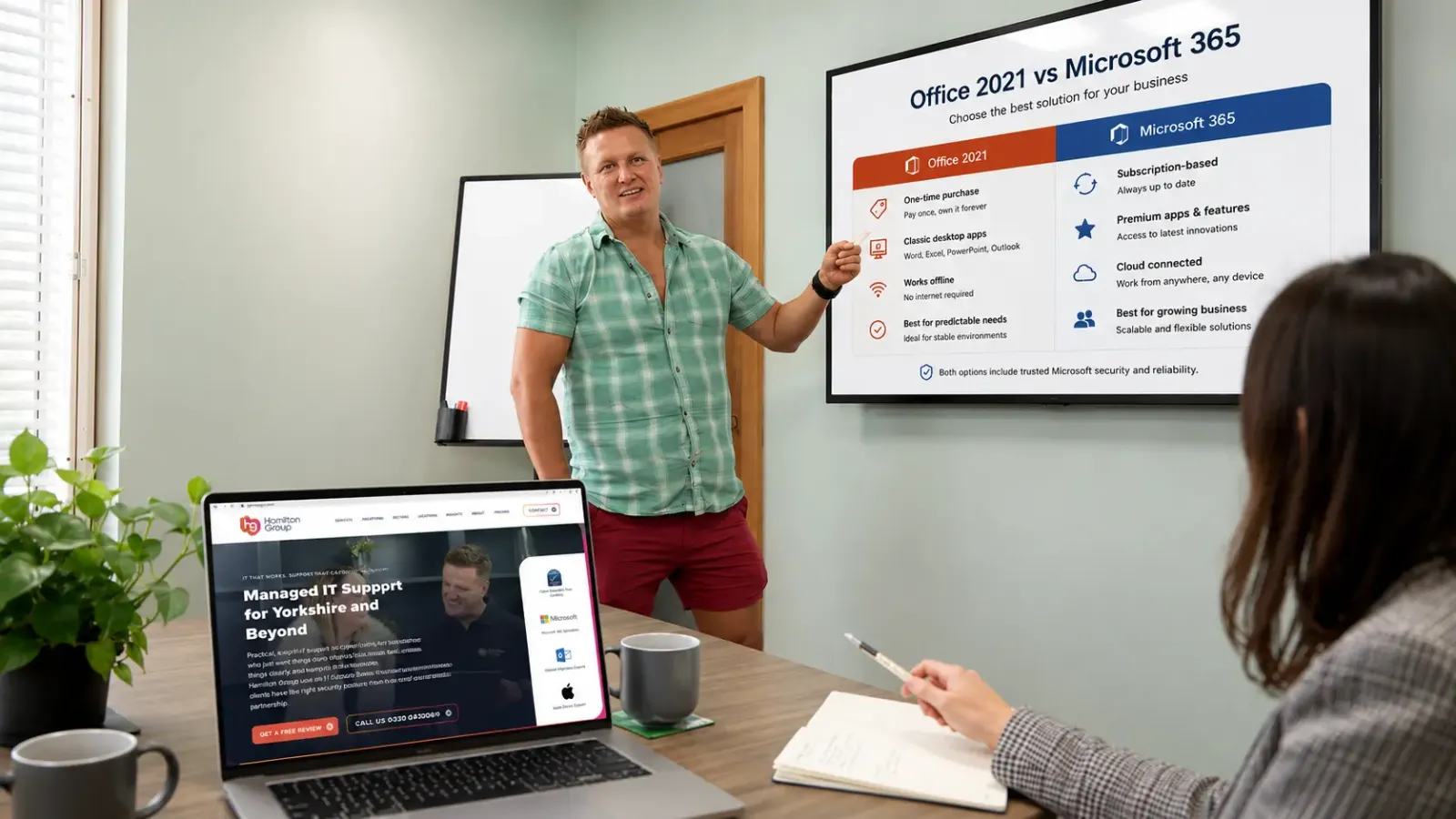
However, organisations often become confused about the difference between Office 2021 and Microsoft 365. Both can provide familiar Microsoft applications, but they are licensed, updated and managed in very different ways.
Office 2021 is purchased once and provides a fixed version of the desktop applications.
Microsoft 365 is a subscription service that can combine continuously updated applications with cloud storage, business email, collaboration, identity management and cybersecurity features.
The right choice depends on how your business works, the systems it already uses and the level of security and collaboration it requires.
There is also an urgent consideration for organisations still using Office 2021: Microsoft support for the product ends on 13 October 2026. After that date, it will no longer receive security updates, bug fixes or technical support.
What Is Office 2021?
Office 2021 is a one-time-purchase version of Microsoft Office.
It provides a fixed edition of familiar desktop applications such as Word, Excel and PowerPoint. The applications included depend on the edition purchased, with some business versions also including Outlook.
Office 2021 does not include the wider cloud services provided through a Microsoft 365 subscription, such as Exchange Online, SharePoint Online or OneDrive for Business. A one-time-purchase licence also does not provide an upgrade to the next major version. A business wanting a newer perpetual version must purchase it separately.
Office 2021 is generally licensed for installation on one PC or Mac rather than assigned as a flexible, multi-device subscription.
What Is Microsoft 365?
Microsoft 365 is a subscription-based collection of productivity, communication, cloud and security services.
Depending on the plan selected, it can include:
- Word
- Excel
- PowerPoint
- Outlook
- Exchange Online
- Microsoft Teams
- SharePoint
- OneDrive
- Microsoft Forms
- Microsoft Lists
- Microsoft Planner
- Microsoft Bookings
- Microsoft Intune
- Microsoft Defender
- Microsoft Entra ID
- Microsoft Purview
Microsoft 365 Business Standard includes desktop, web and mobile versions of the core Microsoft applications, along with 1 TB of cloud storage per user. Teams availability can depend on the specific plan selected.
Microsoft’s Business plans are intended for organisations with up to 300 users. Larger businesses can use Microsoft 365 enterprise plans.
The Main Difference Between Office 2021 and Microsoft 365
The main difference is that Office 2021 is a fixed software purchase, while Microsoft 365 is an ongoing service.
With Office 2021, the business purchases a particular version of the applications. Those applications continue to operate, but they do not receive the ongoing feature improvements available through Microsoft 365.
With Microsoft 365, the organisation pays per user on a monthly or annual subscription. Supported applications receive ongoing updates, and users can gain access to cloud and security services based on their assigned licence.
The decision is therefore not simply about whether the business wants Word or Excel.
It is about whether the organisation needs only desktop applications or a wider platform for email, collaboration, security, storage and device management.
Office 2021 Is Approaching End of Support
The most important issue for current Office 2021 users is its approaching end-of-support date.
Support for Office 2021 ends on 13 October 2026. Microsoft states that there will be no extension and no extended security updates for the product.
The applications may continue opening after the deadline, but Microsoft will no longer provide:
- Security updates
- Bug fixes
- Software updates
- Technical support
- Compatibility corrections
Unsupported software can create security and compliance risks because newly discovered vulnerabilities may remain uncorrected.
Office documents and email attachments are common methods used to distribute malicious content. Continuing to use an unsupported Office installation may therefore expose the business to unnecessary risk.
Any organisation still running Office 2021 should begin planning its replacement now rather than waiting until October.
One-Time Cost vs Subscription Cost
Office 2021 is purchased through one upfront payment.
This can appear attractive to a business that wants to avoid an ongoing subscription.
Microsoft 365 normally charges per user, each month or year, depending on the commercial agreement.
At first glance, Office 2021 may appear less expensive because the business pays once. However, a meaningful comparison should also consider what is included.
An Office 2021 purchase may provide only the desktop applications. The business may still need separate services for:
- Business email
- Cloud storage
- File sharing
- Video meetings
- Device management
- Endpoint security
- Identity protection
- Compliance
- Remote working
- Backup
Microsoft 365 can combine several of these requirements within one platform, depending on the plan selected.
The lowest purchase price is not always the lowest overall cost.
Businesses should compare the complete cost of providing, managing and securing their IT environment.
Software Updates and New Features
Office 2021 is a fixed release.
It receives applicable security and stability updates during its support lifecycle, but it does not receive the continuous flow of new functionality provided to Microsoft 365 subscribers.
Microsoft 365 applications are regularly updated with improvements, security fixes and supported new features.
This means the Microsoft 365 version of Word or Excel may eventually provide capabilities that do not appear in Office 2021.
For businesses, ongoing updates can provide benefits including:
- Improved application compatibility
- New productivity tools
- Enhanced collaboration
- Better cloud integration
- Updated security features
- Support for newer services
Updates still need to be managed properly.
A business should not rely on each employee to maintain their own installation. Microsoft 365 applications should be centrally deployed and monitored wherever possible.
Working Across Several Devices
Office 2021 is normally licensed for one installation on one computer.
This can become limiting for employees who use a desktop computer, laptop, tablet and mobile phone.
Eligible Microsoft 365 business licences allow a user to install the applications on up to five PCs or Macs, five tablets and five mobile devices.
This can support employees who move between:
- Office computers
- Home-working devices
- Business laptops
- Tablets
- Mobile phones
- Shared locations
The licence is associated with the user rather than permanently tied to one device.
This can make it easier to replace equipment and maintain access when an employee works from several locations.
Cloud Storage
Office 2021 does not include OneDrive for Business or SharePoint Online.
Employees can create and save documents locally, but the organisation needs another system if it wants centralised cloud storage, secure sharing or access from several devices.
Microsoft 365 Business Standard provides 1 TB of OneDrive storage per licensed user and includes SharePoint for shared organisational information.
OneDrive is generally suitable for an employee’s individual working files.
SharePoint is better suited to shared business documents, department information and collaborative libraries.
When these services are organised properly, employees can:
- Access approved files from different locations
- Work on documents with colleagues
- Use version history
- Reduce email attachments
- Share controlled links
- Search for information
- Recover previous document versions
Cloud storage still requires suitable permissions, external-sharing controls and backup arrangements.
Moving documents into Microsoft 365 does not automatically make them organised or secure.
Email and Calendars
Office 2021 may include the Outlook desktop application, depending on the edition purchased.
However, Outlook itself is not an email-hosting service.
The business still needs a mailbox provider or its own email server.
Microsoft 365 business plans can include Exchange Online, providing centrally managed email, calendars and contacts.
This can support:
- Professional business email
- Shared mailboxes
- Shared calendars
- Distribution groups
- Mobile access
- Mail-flow policies
- Spam filtering
- Mailbox auditing
- Retention settings
Using Outlook 2021 with an existing email account is therefore not the same as using Outlook with Microsoft 365.
One is the application used to read email. The other can include the wider business-email service that stores, protects and manages the mailbox.
Collaboration
Office 2021 is primarily focused on the desktop applications.
Some collaboration may still be possible when documents are stored through a separate compatible cloud service. However, those services are not included with the Office purchase.
Microsoft 365 is designed around cloud-based collaboration.
Depending on the plan, employees can work together through:
- Microsoft Teams
- SharePoint
- OneDrive
- Shared calendars
- Co-authoring
- Microsoft Lists
- Planner
- Forms
- Shared mailboxes
Several employees can work on the same supported document without emailing separate copies back and forth.
This can reduce problems such as:
- Duplicate files
- Conflicting versions
- Lost attachments
- Unclear ownership
- Outdated documents
- Information stored in personal folders
Collaboration still needs governance.
Microsoft Teams, SharePoint sites and sharing links should have clear owners, naming standards, permissions and review dates.
Remote and Hybrid Working
Office 2021 applications can be installed on a supported computer and used locally.
However, the software alone does not provide a complete remote-working solution.
The business still needs to decide how employees will securely access:
- Shared documents
- Business applications
- Customer information
- Internal communications
Microsoft 365 can support remote and hybrid working through cloud email, OneDrive, SharePoint, Teams and central identity management.
Eligible subscriptions allow the applications to be installed across a user’s supported devices, while business information remains connected to the organisation’s Microsoft 365 environment.
Suitable security controls should still be applied, including:
- Multi-factor authentication
- Device encryption
- Managed endpoint protection
- Conditional Access
- Secure screen locks
- Security patching
- Remote device management
Cloud access should not mean unrestricted access from any device.
Cybersecurity
Office 2021 provides productivity applications, but it does not provide a complete cybersecurity platform.
The business still needs to secure:
- User identities
- Devices
- Documents
- Remote access
- Cloud applications
- Administrator accounts
Microsoft 365 security capabilities vary between plans.
Microsoft 365 Business Premium is designed to combine productivity applications with identity, device-management and security capabilities. It can include services such as Microsoft Intune, Microsoft Entra ID and Microsoft Defender for Business.
These services can help a business:
- Enforce multi-factor authentication
- Apply Conditional Access
- Manage computers and mobile devices
- Deploy security policies
- Protect endpoints
- Review security alerts
- Restrict unmanaged devices
- Remove business information remotely
Microsoft 365 still requires professional configuration and monitoring.
Purchasing Business Premium does not automatically activate or correctly configure every available protection.
Multi-Factor Authentication
A stolen password can give an attacker access to business email, files and cloud services.
Microsoft 365 allows organisations to protect supported services using multi-factor authentication.
This requires an additional verification method when a user signs in.
Office 2021 does not provide a business identity platform by itself. It may connect to an account that uses multi-factor authentication, but the Office purchase does not include the wider identity-management service.
For businesses using cloud email and document storage, identity protection is one of the most important differences between a standalone Office purchase and a managed Microsoft 365 environment.
Central User Management
With Office 2021, licences may be associated with individual devices or separate purchases.
This can become difficult to manage as employees join, leave or change computers.
Microsoft 365 uses user-based licensing.
An administrator can assign or remove licences through the Microsoft 365 environment.
This can simplify:
- Employee onboarding
- Employee offboarding
- Licence management
- Password resets
- Access reviews
- Device changes
- Application deployment
When an employee leaves, their access can be removed centrally.
Their Microsoft 365 licence can then be reassigned where the commercial licensing terms permit.
A structured offboarding process should also revoke active sessions, transfer relevant business information and remove access to third-party applications.
Device Management
Office 2021 installs the applications but does not provide a central device-management platform.
The business still needs a method for managing:
- Security settings
- Encryption
- Application deployment
- Device compliance
- Software updates
- Mobile access
- Lost equipment
Microsoft 365 Business Premium includes Microsoft Intune capabilities, allowing supported devices and applications to be managed through cloud policies.
This can be particularly valuable for businesses with remote workers or several locations.
A centrally managed laptop can receive the organisation’s security settings regardless of whether it is connected to the office network.
Compliance and Information Protection
Office 2021 allows employees to create and edit documents.
It does not provide the full Microsoft 365 compliance and information-governance environment.
Depending on licensing and configuration, Microsoft 365 can support:
- Retention policies
- Sensitivity labels
- Data-loss prevention
- Auditing
- eDiscovery
- Information protection
- Access reviews
These controls may be particularly relevant to regulated businesses and organisations that handle confidential customer or employee information.
Technology does not decide the organisation’s legal or regulatory requirements.
The business must first establish suitable policies and then configure Microsoft 365 to support them.
Backups and Recovery
Neither Office 2021 nor a Microsoft 365 subscription removes the need for a clear backup strategy.
Documents stored only on an Office 2021 computer could be lost through:
- Hardware failure
- Theft
- Accidental deletion
- Ransomware
- File corruption
Microsoft 365 provides cloud availability, retention and recovery capabilities, but businesses should still determine whether a separately managed backup service is required for Exchange Online, SharePoint, Teams and OneDrive.
The organisation should understand:
- What is protected
- How long data is retained
- Who can delete it
- How quickly it can be recovered
- When recovery was last tested
Cloud storage and backup are not the same thing.
Internet Connectivity
Office 2021 can continue being used locally after installation and activation.
This may be useful in specialist environments with limited connectivity.
Microsoft 365 desktop applications can also be used offline for normal document work, but internet access is required periodically for subscription validation, updates and cloud services.
Features such as cloud email, Teams, SharePoint and OneDrive naturally depend on internet connectivity.
Businesses relying heavily on Microsoft 365 should therefore consider:
- Business-grade internet
- Backup connectivity
- Reliable Wi-Fi
- Router and firewall resilience
- Mobile failover
- Internet monitoring
The advantage of cloud working can be reduced when the organisation’s connectivity is unreliable.
Does a One-Time Purchase Mean Permanent Support?
No.
A perpetual licence means the organisation can continue using that purchased version under its licence terms. It does not mean Microsoft will support it indefinitely.
Office 2021 demonstrates this clearly.
The product was released in October 2021 and reaches the end of support on 13 October 2026.
After support ends, the software may continue running, but it will become an unsupported product.
Businesses should not confuse permanent usage rights with permanent security updates.
Which Option Is Better for a Small Business?
For most modern small businesses, Microsoft 365 will provide the more practical long-term platform.
It may be suitable when the organisation needs:
- Business email
- Cloud storage
- Remote working
- Several devices per employee
- File collaboration
- Microsoft Teams
- Central user management
- Multi-factor authentication
- Device management
- Ongoing updates
- Cybersecurity capabilities
Office 2021 may previously have suited a business that needed only fixed desktop applications on one computer.
However, its approaching end-of-support date means it should not now be considered a sensible new deployment.
A business requiring a current one-time-purchase product would need to assess a newer supported version such as Office 2024. Microsoft confirms that one-time-purchase editions do not include future major upgrades and must be purchased again when the business wants the next version.
Is Microsoft 365 Always the Right Choice?
Microsoft 365 is not automatically the right answer for every system.
Some specialist or highly controlled environments may require fixed software versions, limited internet connectivity or long testing periods before application updates are approved.
A perpetual Office edition may also be appropriate for a dedicated computer that does not require cloud services.
However, businesses should consider:
- Product support dates
- Security requirements
- Number of devices
- Remote working
- Collaboration
- Data storage
- Compliance
- Future upgrades
- Total cost
The decision should be based on the complete business requirement rather than a preference to avoid subscriptions.
Common Office 2021 Migration Concerns
Businesses may delay moving because they are concerned about disruption.
Common worries include:
- Will our existing documents still open?
- Will Excel formulas continue working?
- Will Outlook settings be lost?
- Can employees keep their existing email?
- Will macros and add-ins work?
- Do we need to move every file into the cloud?
- Will employees need training?
- Can the migration happen gradually?
Most standard Word, Excel and PowerPoint files can be used with Microsoft 365 applications.
However, specialist templates, add-ins, macros and integrations should be tested before the old installation is removed.
A managed migration should include:
- Device assessment
- Application compatibility checks
- Licence selection
- Data review
- Backup
- Pilot testing
- User communication
- Application deployment
- Security configuration
- Employee training
The old software should not be removed until the new environment has been tested properly.
How to Prepare for the End of Office 2021 Support
Businesses still using Office 2021 should begin by identifying every affected computer.
The review should record:
- Device name
- Assigned employee
- Office edition
- Operating system
- Installed add-ins
- Business applications
- Macros
- Outlook configuration
- Replacement requirements
The organisation should then decide whether to move each user to Microsoft 365 Apps or another supported Office edition.
The migration plan should also review the wider opportunity.
Rather than treating the project as an application replacement, the business could consider whether it would benefit from:
- Cloud email
- SharePoint
- OneDrive
- Microsoft Teams
- Intune
- Defender
- Conditional Access
- Improved file sharing
- Better employee onboarding
Replacing Office 2021 can therefore become part of a wider modernisation and cybersecurity project.
Choosing the Right Microsoft 365 Plan
Businesses should not automatically assign the same licence to everyone.
Different plans provide different combinations of applications, cloud services and security.
For example:
- Some users may need only web applications and business email.
- Others may need the full desktop applications.
- Remote employees may need device management and Conditional Access.
- Employees handling confidential information may require stronger security.
- Larger organisations may need enterprise licensing.
Microsoft 365 Business Basic, Standard and Premium are designed for organisations with up to 300 users.
A licence review should consider each user’s role, devices, information and risk.
Selecting the cheapest plan without reviewing the required security controls can leave important gaps.
Office 2021 vs Microsoft 365: Which Should You Choose?
Office 2021 offered a straightforward way to purchase a fixed version of the desktop Office applications.
However, it does not include the wider cloud, collaboration and security services available through Microsoft 365, and it is now approaching the end of support.
Microsoft 365 is normally better suited to organisations that need:
- Secure cloud email
- Ongoing application updates
- Modern collaboration
- Remote working
- Multi-device access
- Central administration
- Identity security
- Device management
- A platform that can develop with the business
The subscription cost needs to be budgeted, but the comparison should include the additional services and protections the organisation would otherwise need to purchase and manage separately.
Most importantly, businesses should avoid continuing with Office 2021 after security support ends.
How Hamilton Group Can Help
Hamilton Group helps businesses review, migrate and manage their Microsoft applications and Microsoft 365 environments.
We can help with:
- Office 2021 audits
- Microsoft 365 migrations
- Microsoft 365 licence reviews
- Word, Excel, PowerPoint and Outlook deployment
- Exchange Online
- Microsoft Teams
- SharePoint and OneDrive
- Multi-factor authentication
- Conditional Access
- Microsoft Intune
- Managed endpoint protection
- Microsoft Defender
- Email security
- Microsoft 365 backups
- Employee training
- Ongoing managed IT support
We can identify which computers still use Office 2021, check compatibility with important applications and create a managed migration plan before support ends on 13 October 2026.
At Hamilton Group, we aim to make first contact on IT support requests within 15 minutes, helping employees receive assistance quickly when a technical issue affects their work.
Call Hamilton Group today on 0330 043 0069 to discuss moving from Office 2021 to a secure, supported Microsoft 365 environment.
Microsoft products, features and licensing can change. Businesses should review current Microsoft licensing and obtain appropriate technical advice before purchasing or migrating services.