Man-in-the-Middle Attacks: Another Reminder to Stay Protected
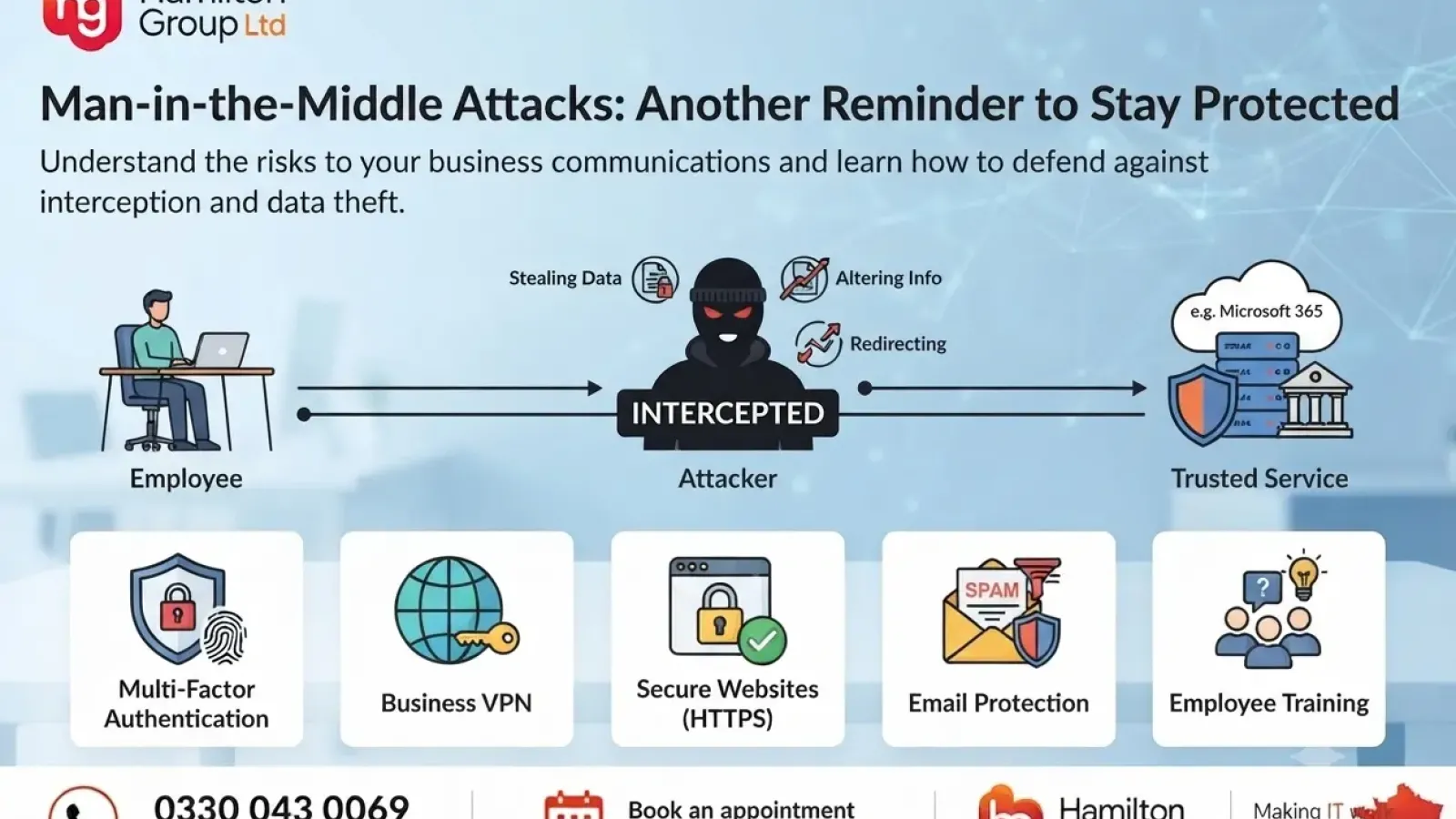
Cyber attacks do not always involve criminals breaking directly into a server or deploying ransomware. Sometimes, the attacker simply positions themselves between two people, devices or systems and quietly observes what is happening.
This is known as a man-in-the-middle attack, often shortened to MITM attack.
These attacks can allow criminals to intercept emails, steal passwords, capture payment information, alter communications or redirect users to fake websites. Because the attacker may remain hidden between two trusted parties, the victim might not realise anything is wrong until sensitive information has already been exposed.
For businesses, a man-in-the-middle attack is another important reminder that secure networks, encrypted connections and strong identity protection are essential.
What Is a Man-in-the-Middle Attack?
A man-in-the-middle attack happens when a cyber criminal secretly intercepts communication between two parties.
For example, an employee may believe they are communicating directly with a website, cloud service, colleague or supplier. In reality, the attacker has placed themselves between both sides and can monitor or manipulate the information being exchanged.
A simple communication path should look like this:
Employee → Trusted service
During a man-in-the-middle attack, it may instead look like this:
Employee → Attacker → Trusted service
The attacker may pass information between both parties so that the connection appears normal. This can make the attack particularly difficult to detect.
Depending on the method used, criminals may be able to:
- Read confidential messages
- Capture usernames and passwords
- Steal banking or payment information
- Intercept session cookies
- Alter payment details
- Redirect users to fraudulent websites
- Impersonate trusted individuals
- Insert malicious files or links
- Access business systems
How Do Man-in-the-Middle Attacks Happen?
There are several ways an attacker may intercept communications.
Unsecured Public Wi-Fi
Public Wi-Fi networks can present a significant risk, particularly when they are open or poorly secured.
An attacker connected to the same network may attempt to monitor traffic or exploit weaknesses in the connection. This can be particularly dangerous when employees are accessing business email, cloud systems or sensitive documents.
Hotels, cafés, airports, conference centres and shared workspaces are common locations where employees may connect to unfamiliar networks.
Fake Wi-Fi Networks
Cyber criminals may create a wireless network with a convincing name, hoping users will connect to it.
For example, an attacker could create a network called:
- Hotel Guest Wi-Fi
- Free Airport Wi-Fi
- Conference Wi-Fi
- Café Customer Network
- Office Guest
Once connected, the user’s internet traffic may pass through equipment controlled by the attacker.
These networks are sometimes known as evil twin hotspots because they imitate a legitimate wireless network.
Email Account Compromise
A man-in-the-middle-style attack can also occur through compromised email accounts.
If a criminal gains access to a supplier’s or employee’s mailbox, they may monitor conversations and wait for an opportunity to interfere.
The attacker could then:
- Change bank account details on an invoice
- Send a fraudulent payment request
- Impersonate a senior employee
- Insert themselves into an existing email chain
- Redirect confidential documents
- Request login details or access
Because the criminal is using a genuine email account or an established conversation, the message may appear highly convincing.
DNS Spoofing
The Domain Name System, or DNS, helps direct users to the correct website when they enter an address into their browser.
In a DNS spoofing attack, a criminal manipulates this process and redirects the user to a fraudulent website.
The fake website may look almost identical to the real service and may be designed to capture usernames, passwords or payment details.
Session Hijacking
When users sign into a website, the service may use a session cookie to keep them logged in.
If an attacker steals this session information, they may be able to access the account without needing the victim’s password.
This is one reason why protecting browser sessions, devices and network traffic is so important.
Website Certificate Attacks
Secure websites use encryption certificates to protect information travelling between the user and the website.
Attackers may attempt to:
- Exploit incorrectly configured certificates
- Redirect users to an unencrypted version of a website
- Present fake certificate warnings
- Trick users into ignoring browser security alerts
Employees should never ignore certificate warnings without first confirming the cause with their IT provider.
What Information Can Criminals Steal?
A successful attack may expose almost any information transmitted across the compromised connection.
This could include:
- Microsoft 365 login details
- Business email credentials
- Online banking information
- Customer data
- Employee records
- Payment card information
- Confidential documents
- Remote access credentials
- Cloud application passwords
- Supplier details
- Sensitive messages
- Intellectual property
Even one stolen password may give an attacker access to several systems, particularly where the same credentials have been reused.
Why Are Businesses at Risk?
Modern businesses depend heavily on cloud platforms, remote working, mobile devices and online communication.
Employees may access company information from:
- Home networks
- Hotels
- Customer premises
- Shared offices
- Mobile hotspots
- Public transport
- Airports and cafés
This flexibility improves productivity, but it also creates more opportunities for attackers to target connections outside the protected office environment.
Businesses may be particularly vulnerable when they have:
- Weak or reused passwords
- No multi-factor authentication
- Poorly secured Wi-Fi
- Unmanaged personal devices
- Outdated software
- Limited security monitoring
- Unencrypted websites or applications
- No secure remote access solution
- Inadequate employee awareness training
- Excessive user permissions
Warning Signs of a Possible Attack
Man-in-the-middle attacks are designed to remain hidden, but there may still be warning signs.
Employees should be cautious if they notice:
- Unexpected certificate or browser warnings
- Websites suddenly appearing without HTTPS
- Repeated login requests
- Unusual redirects
- Slow or unstable internet connections
- Login alerts from unfamiliar locations
- Unexpected multi-factor authentication prompts
- Changed bank details in an existing email conversation
- Messages that appear within a genuine email chain but feel unusual
- Requests to bypass normal payment procedures
- Security alerts from Microsoft 365 or another cloud provider
Any suspicious behaviour should be reported immediately.
How to Protect Your Business
There is no single control that stops every man-in-the-middle attack. Effective protection requires several layers of security.
Use Multi-Factor Authentication
Multi-factor authentication adds an extra verification step when a user signs in.
Even if a criminal captures a password, they may still be unable to access the account without the second authentication factor.
MFA should be enabled across:
- Microsoft 365
- Cloud applications
- Remote access services
- Administrative accounts
- Financial systems
- Password managers
Where possible, businesses should use stronger authentication methods rather than relying only on text-message codes.
Avoid Untrusted Wi-Fi Networks
Employees should avoid connecting business devices to open or unfamiliar wireless networks.
Where internet access is required, a trusted mobile hotspot may be safer than public Wi-Fi.
Staff should also be trained not to choose a network simply because its name looks legitimate.
Use a Business VPN
A virtual private network can encrypt traffic between a device and a trusted business network or security service.
This can provide additional protection when employees are working remotely or travelling.
However, a VPN must be configured and managed correctly. Consumer-grade or free VPN services may not provide appropriate protection for business use.
Keep Software and Devices Updated
Security updates often address vulnerabilities that could be used to intercept communications or compromise devices.
Businesses should regularly update:
- Operating systems
- Web browsers
- Mobile devices
- Firewalls
- Wireless access points
- VPN software
- Cloud applications
- Network equipment
Automated patch management can help ensure updates are applied consistently.
Use Secure Websites and Applications
Employees should check that websites use HTTPS, especially before entering login or payment information.
A padlock icon alone does not guarantee that a website is trustworthy, but the absence of HTTPS should always be treated as a warning.
Businesses should also ensure their own websites, portals and applications use properly configured encryption certificates.
Protect Business Email
Email protection is essential because criminals may use compromised mailboxes to monitor conversations and manipulate payment requests.
Important controls include:
- Multi-factor authentication
- Strong spam and phishing protection
- Suspicious login monitoring
- Email security policies
- Domain protection using SPF, DKIM and DMARC
- Restrictions on automatic forwarding
- Regular access reviews
- User awareness training
Verify Payment Changes Independently
Any request to change supplier bank details should be verified through a separate, trusted communication method.
Do not rely solely on replying to the same email thread.
Instead:
- Call a known contact using an independently verified telephone number
- Follow the organisation’s payment approval process
- Require secondary approval for payment changes
- Record the verification
- Be cautious of urgency or secrecy
This simple process can prevent significant financial loss.
Use Managed Devices
Business information should ideally be accessed from devices controlled and protected by the organisation.
Managed devices can be configured with:
- Endpoint protection
- Disk encryption
- Security updates
- Access policies
- Web filtering
- Mobile device management
- Remote wipe capabilities
- Conditional access controls
This reduces the risk associated with unmanaged personal devices.
Monitor for Suspicious Activity
Security monitoring can identify unusual behaviour that may indicate an account or device has been compromised.
Examples include:
- Sign-ins from unexpected countries
- Impossible travel alerts
- Unusual mailbox rules
- Large downloads
- Suspicious administrative changes
- Access from unknown devices
- Repeated failed login attempts
- Unexpected consent to third-party applications
Early detection can significantly reduce the impact of an attack.
Train Employees to Recognise the Risk
Technical controls are important, but staff awareness remains a critical part of cyber security.
Employees should understand:
- The risks of public Wi-Fi
- How to recognise browser warnings
- Why unexpected MFA prompts should be denied
- How to verify payment changes
- Why passwords should never be reused
- How to report suspicious activity
- Why urgent requests should be treated carefully
Regular training helps turn employees into an additional layer of defence.
What Should You Do If You Suspect an Attack?
If your business suspects a man-in-the-middle attack, act quickly.
Recommended steps include:
- Disconnect the affected device from the network.
- Contact your IT or cyber security provider.
- Change potentially exposed passwords from a trusted device.
- Revoke active user sessions.
- Review sign-in and email activity.
- Check for suspicious mailbox rules or forwarding.
- Notify financial teams if payment information may have been altered.
- Monitor accounts for further suspicious activity.
- Preserve relevant logs and evidence.
- Follow your incident response procedure.
Avoid continuing to use the affected connection until it has been checked.
Man-in-the-Middle Attacks and Remote Working
Remote and hybrid working have made secure access more important than ever.
Employees may be working outside the protection of the corporate network, making controls such as secure access, device management and identity protection essential.
Businesses should consider using:
- Multi-factor authentication
- Conditional access
- Managed laptops and mobile devices
- Secure VPN or zero-trust access
- Endpoint detection and response
- Cloud security monitoring
- Encrypted communications
- Regular security awareness training
Remote working should not mean accepting lower security standards.
How Hamilton Group Can Help
At Hamilton Group, we help businesses protect their networks, users and data against modern cyber threats.
We can support your organisation with:
- Microsoft 365 security
- Multi-factor authentication
- Conditional access
- Managed endpoint protection
- Email security
- Network and firewall protection
- Secure remote working
- Vulnerability management
- Cyber security monitoring
- Staff awareness training
- Backup and disaster recovery
- Incident response planning
We can also review your current environment to identify weak points that could increase the risk of intercepted communications, compromised accounts or fraudulent payments.
Our team will explain the risks clearly and help implement practical security controls that support the way your business operates.
Stay Protected
Man-in-the-middle attacks demonstrate how cyber criminals can exploit trust between users, networks and systems.
A connection may look normal. An email may appear genuine. A Wi-Fi network may have a convincing name. However, without the right security controls, attackers may be watching, stealing or altering information behind the scenes.
Strong authentication, secure networks, protected devices, effective monitoring and well-trained employees all help reduce the risk.
To discuss your cyber security or arrange a review of your IT environment, contact Hamilton Group on 0330 043 0069 and speak to one of our experts.